

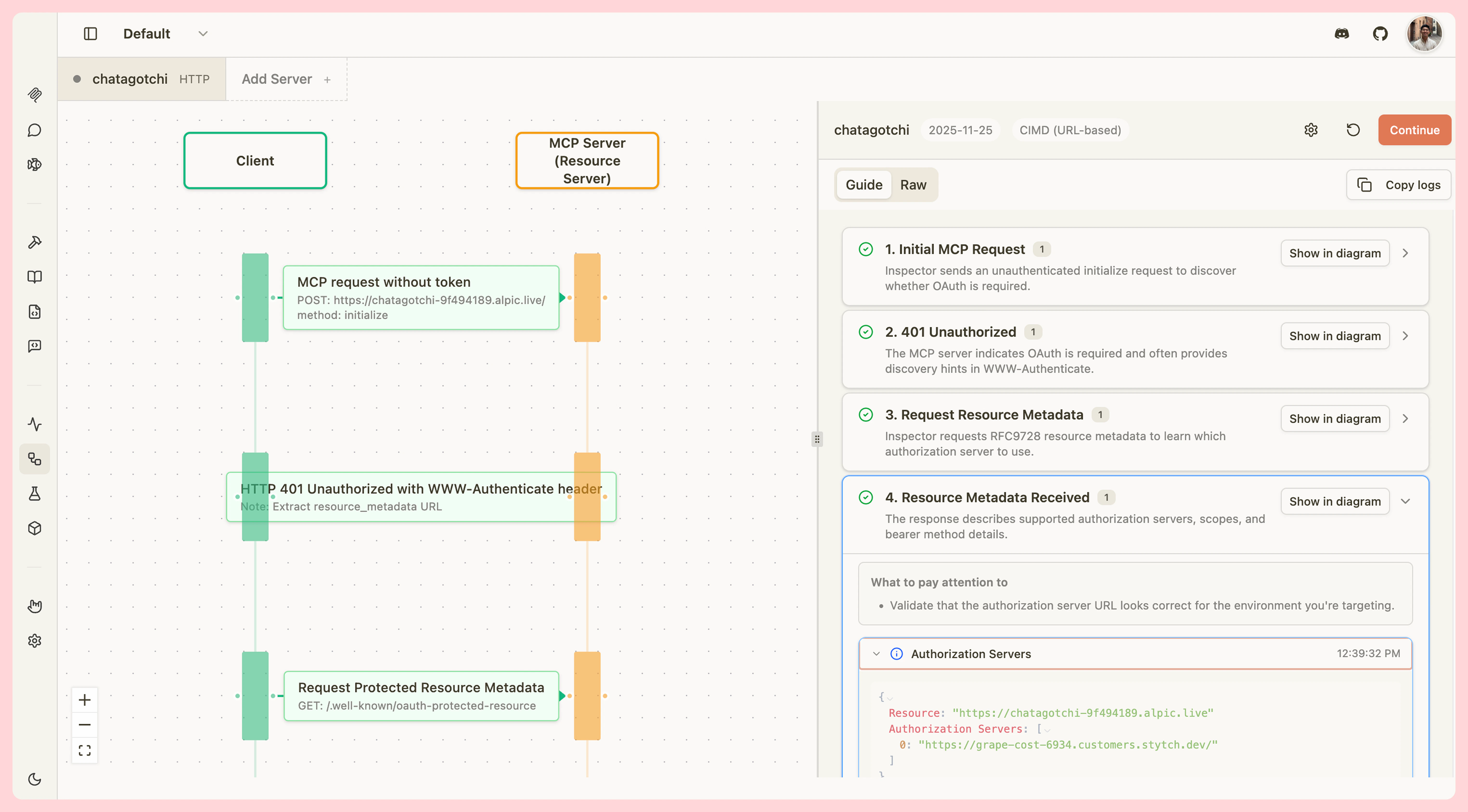
The OAuth Debugger provides a visual, step-by-step interface for testing and debugging your MCP server’s OAuth 2.1 implementation. View every step of the OAuth handshake in detail with guided explanations, inspect network messages, and validate your implementation against multiple protocol versions. The debugger is fully compliant with MCP OAuth specification.Documentation Index
Fetch the complete documentation index at: https://mcpjam-mintlify-docs-update-pr-1993-1777697677028.mintlify.app/llms.txt
Use this file to discover all available pages before exploring further.
Key Features
The OAuth Debugger provides comprehensive tooling for testing OAuth implementations:- Visual Step-by-Step Guide - Interactive flow guide with detailed explanations for each OAuth step
- Multi-Protocol Support - Test against OAuth spec versions 03-26, 06-18, and 11-25
- Full Registration Methods - Support for client pre-registration, Dynamic Client Registration (DCR), and Client ID Metadata Documents (CIMD)
- Network Inspection - View all HTTP requests and responses with headers and body content
- Educational Context - Built-in teachable moments and tips for common OAuth issues
- Sequence Diagram - Visual representation of the OAuth flow synchronized with your progress
- Export Capabilities - Copy logs in guide or raw format for debugging and documentation
Pre-registered client secrets
When you configure a pre-registered OAuth client with a client secret, the secret is stored securely and never exposed in the UI after saving. The client secret field shows the following controls:- Reveal (hosted mode only) — Fetches and temporarily displays the stored secret so you can copy it. The value is hidden again when you close the panel or navigate away.
- Clear — Marks the secret for removal. The secret is deleted from storage when you save. Click Undo to cancel before saving.
- Replace — Type a new value into the client secret field to replace the stored secret on the next save. Entering a new value automatically cancels any pending clear.
In hosted mode, client secrets are stored in a secure vault and are never written to your browser’s local storage. In local mode, the secret is stored in your browser’s local storage alongside the rest of your server configuration.
Authorization header conflict warning
If you enable OAuth and also add a customAuthorization header under Advanced settings, a warning appears. OAuth automatically sets the Authorization header when exchanging tokens, which may override or conflict with your custom value. Remove the custom header or switch to a different authentication method to avoid unexpected behavior.
Getting Started
To begin debugging OAuth flows:- Navigate to the OAuth Debugger - Click the OAuth Flow tab in MCPJam Inspector
- Configure a Target Server - Click Configure Target to open the OAuth Profile Modal
- Enter Server Details - Provide your server’s base URL and select your protocol version
- Choose Registration Method - Select CIMD, DCR, or pre-registered based on your implementation
- Start Testing - Click Continue to begin the OAuth flow